Cloud
How oXya Successfully Migrated to SAP Cloud ERP
– Oct 8, 2026
We wanted a new foundation to build the future
At the beginning of 2026, oXya achieved SAP PartnerEdge – Sell status and now supports customers throughout their SAP Cloud ERP transformation journey, whether with SAP GROW or RISE with SAP, from consulting and implementation to managed services and ongoing operations.
This expertise is built on firsthand experience. oXya decided to migrate its own ERP landscape to SAP Cloud ERP and successfully went live in June 2025.
In this interview, David Vergin, CIO of oXya, looks back on the key stages of the project, the challenges faced, the decisions made, and the lessons learned that can help organizations planning their own transition to SAP Cloud ERP.
What led you to migrate to SAP Cloud ERP (SAP GROW), and how did you approach this decision?
In 2024, we found ourselves facing a situation that is fairly common for fast-growing organizations: an aging SAP ECC 6.0 EHP7 environment, functional limitations in certain areas, and recurring issues around reporting capabilities.
As oXya continued its international expansion, we also identified growing differences in business processes across different countries. We did not want to wait until the end of SAP ECC maintenance in 2027 forced us to act. Maintaining the status quo would have increased risks related to security, technology compatibility, and access to future innovations.
We were also convinced that planning ahead for such a project would allow us to better control costs, timelines, consultant availability, and business impacts. That led us to a clear conclusion: it was time to better equip ourselves to ensure the sustainability of our information system and provide a new foundation to build the future of the company.
We decided to migrate to SAP Cloud ERP with SAP GROW, using a Greenfield approach, as it is the required method to adopt SAP Cloud ERP. This perfectly aligned with our objectives: adopting SAP standard processes and best practices as extensively as possible, and preparing for future innovations, particularly in the area of artificial intelligence.
SAP Cloud ERP does not operate in isolation. It is supported by a broader SAP ecosystem that includes SAP Cloud ALM, SAP Cloud Identity Suite and SAP Integration Suite.
One important point is that SAP Integration Suite is not included in the SAP Cloud ERP contract. Organizations looking to connect SAP Cloud ERP with external systems should consider it an essential addition to ensure seamless interoperability.
At the same time, our legacy SAP ECC environment did not disappear overnight. We were using ECC for both financial processes and our HR information system. We decided to keep the HR system on SAP ECC for the time being and address its replacement at a later stage.
Where did you start, and how was the project scoping phase organized?
A Greenfield project requires strong business involvement from day one. This is a critical success factor, especially when business teams must contribute to the project while continuing to manage day-to-day operations.
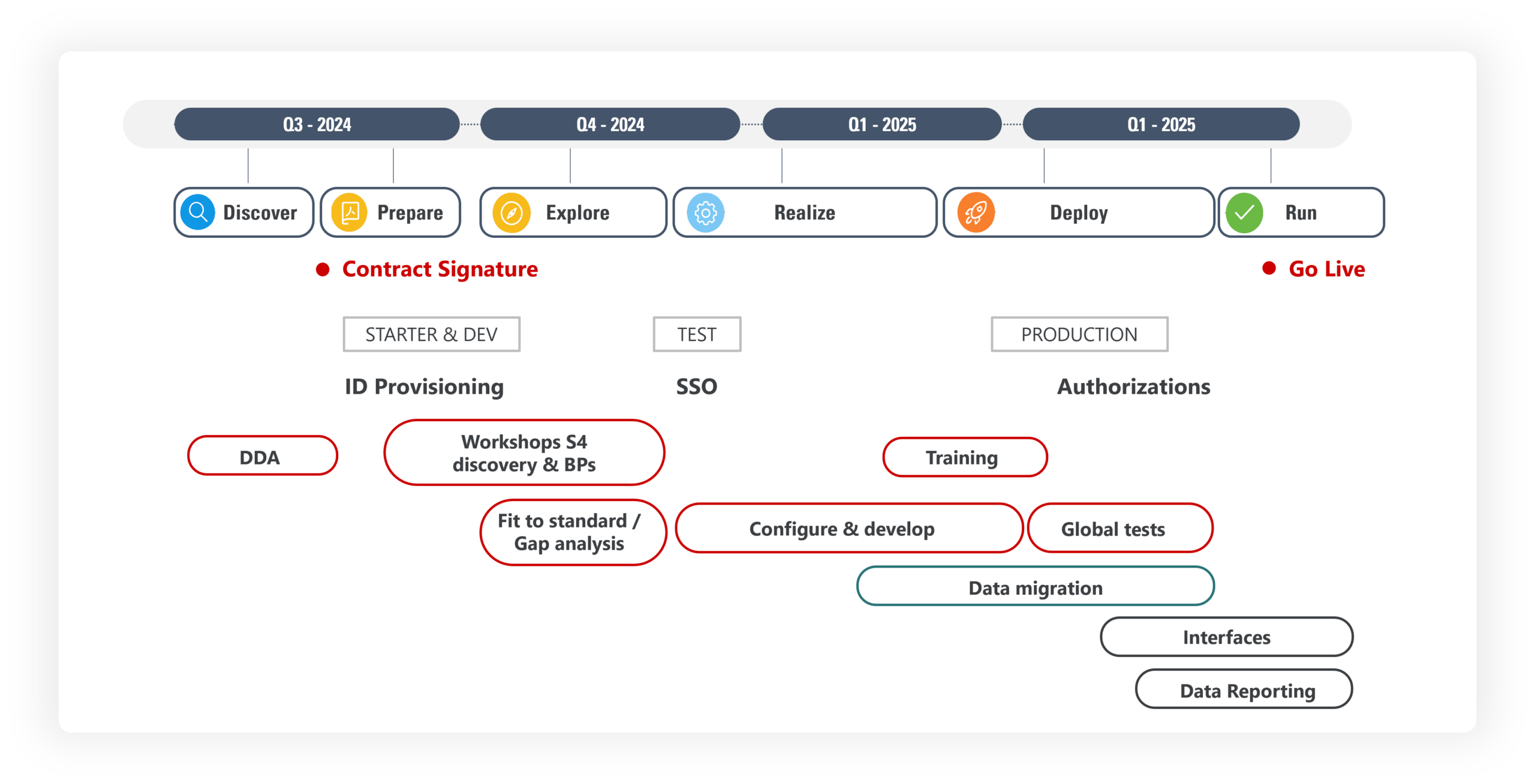
The first major milestone was the Digital Discovery Assessment (DDA), conducted during the Discover phase of the SAP Activate methodology. SAP Activate provides a structured framework based on six phases to guide the transformation:
Discover -> Prepare -> Explore -> Realize -> Deploy -> Run
The DDA plays a key role in defining the company profile and selecting the bundles that will be implemented and configured. SAP provides approximately 1,500 available scope items. We started with a selection of 246 scope items distributed across two primary bundles: “Baseline Accelerator” and “Enterprise Management”.
This stage must be validated with business stakeholders and discussed with end users to avoid overlooking important business processes. While a missing process can always be added later, doing so requires activating and configuring additional scope items outside of the initial project scope. It is therefore preferable to anticipate those issues as early as possible.
After the scoping phase, what were the main areas of focus to ensure a successful implementation?
The Explore phase allows business users to experience the future system in a practical way.
From the outset, SAP provides access to a Starter System, a preconfigured environment where users can log in and test standard functionality, familiarize themselves with the solution, and identify gaps between standard capabilities and business requirements.
These gaps are then categorized and addressed either through process changes or through customization using Business Add-Ins (BAdIs), custom fields or other adjustable settings.
Throughout the project, we maintained a strong Fit-to-Standard mindset. The closer you remain to the SAP standard, the easier it becomes to adopt future SAP evolutions and the more manageable the testing cycles are during the two annual upgrades.
Data Migration
Data migration is another major area that requires significant attention and strong business involvement.
The objective is not just to move data but to help business users take ownership of it and define clear rules, in collaboration with the technical teams.
We used SAP’s Data Migration Cockpit, which allows for a test import and provides feedback on data consistency even before launching the final import. We chose to use Excel files to ensure high data quality and avoid manual corrections after the transfer.
Security and Authorizations
On the security front, Single Sign-On (SSO) implementation proved relatively straightforward.
Authorizations, however, are a much more critical issue. Authorization design directly impacts Segregation of Duties (SoD) management, business role identification and, above all, the number of billed FUEs (Full Use Equivalent).
FUE consumption determines whether your usage remains within the scope of the contract signed with SAP. This is a dynamic metric that can be viewed on SAP for Me and that requires attention right from the design phase.
Project Timeline
The project officially started in September 2024, with go-live taking place in early June 2025, representing a nine-month implementation completed by a relatively small team.
One planning consideration that organizations should not overlook is that activating the production environment triggers the deletion of the Starter System within thirty days. Any final training sessions or remaining activities should therefore be completed before production activation.
What tangible benefits have you seen, and what comes next?
Several improvements have been particularly well received by our teams.
On the Procure-to-Pay (P2P) side, we successfully standardized the way orders are placed, and supplier payments are processed worldwide. This has created much greater clarity across the organization and has been especially appreciated during audits.
For Record-to-Report (R2R) processes, CDS Views provide direct integration with Microsoft Power BI, significantly reducing reliance on Excel files.
One of the most frequently mentioned benefits is the autonomy enabled by SAP Fiori. Business users can now customize their views and filters, allowing them to analyze the data without depending on IT.
For employees new to SAP, Fiori provides a modern and intuitive web experience. For long-time SAP users accustomed to traditional transactions, change management is essential to show them how to find their bearings.
This is where SAP Activate proves particularly valuable, as users gain hands-on experience with the solution early in the project lifecycle.
Ultimately, the transformation provided us with a new foundation for our Finance information system ‒ one that is more standardized, more transparent, and better prepared for future developments.
Continuous Improvement After Go-Live
Our work did not stop after deployment.
Electronic invoicing became an immediate priority for 2026, with Belgium going live in March and France in September. We selected Easy to Invoice, a solution specifically designed to integrate with SAP S/4HANA and SAP Cloud ERP.
We also launched a data platform project aimed at centralizing and cross-referencing data from SAP and our other business systems to improve analytics and decision-making.
On the AI front, we activated Joule Base and challenged ourselves with a concrete use case identified through SAP EarlyWatch: SAP Cash Application, which automates bank account reconciliation processes and helps our teams save valuable time.
In fact, one simple recommendation I would give to any organization is this: read your SAP EarlyWatch reports. They often contain valuable insights and can reveal opportunities for innovation.
How has this project influenced oXya’s service offering?
This experience also had a direct impact on our organization.
Throughout the project, we mobilized many experts internally to gain a deep understanding of SAP Cloud ERP modules and build a solid foundation of knowledge about SAP Cloud ERP. The natural next step was to integrate this functional expertise into our service offering.
Today, oXya offers a dedicated Application Management Services (AMS) offering for SAP Cloud ERP, supporting customers throughout their transformation journey, from consulting and implementation to day-to-day operations and optimization.
Our objective is simple: help organizations benefit from the lessons we learned during our own migration, secure their transformation roadmap, control ongoing operations, and continue to evolve their SAP environment after go-live.
Other articles

3 SAP Cloud ALM Adoption Mistakes That Put Implementation Value at Risk
Jorge Herrera Abundis
Read more