SAP
Data separation: how SAP carve-out slicing really works
– Sep 29, 2026

In a divestiture, a business unit’s data has to leave its comfy shared SAP system and stand up on its own. Most of the technical difficulty sits in one question: what belongs to the entity being sold?
A data model with no line in it
SAP was never purposedly built to be split by legal entity. Master data, configuration and transaction history are shared across organizational levels on purpose. That sharing is what makes a single system efficient to run, and it is exactly what makes it hard to divide.
An SAP carve-out is the exercise of drawing a line through a data model that has no line in it.
When the project runs against a Transition Services Agreement (TSA), the approach that fits the clock is a selective data transition: extract the data that belongs to the divested entity, and nothing else.
Slicing starts with a selector
The primary selector is almost always the company code, the legal entity in SAP.
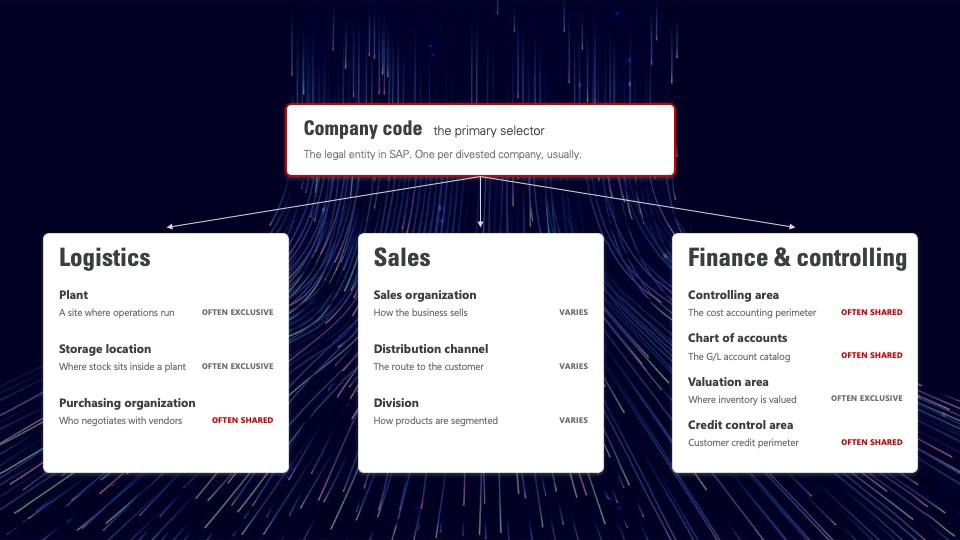
But a company code never travels alone. It brings a whole enterprise structure with it, and each element has to be examined:
- Plants, the sites where operations physically happen, and the storage locations inside them where stock is held.
- Purchasing organizations, the units that negotiate with vendors. Some serve a single plant, others serve the entire group.
- Sales organizations and divisions, which define how the business sells and how it segments its products.
- The controlling area, the cost accounting perimeter. It frequently covers several company codes at once.
- The chart of accounts, the general ledger catalog, usually defined once for the whole corporation.
- The valuation area, where inventory values are calculated, and the credit control area, which governs customer credit.
The first real deliverable of a technical assessment is a map of this structure: which elements are exclusive to the divested entity, and which are shared with the businesses staying behind. Get that map wrong and every slicing rule built on top of it inherits the error.
Where the selector stops working
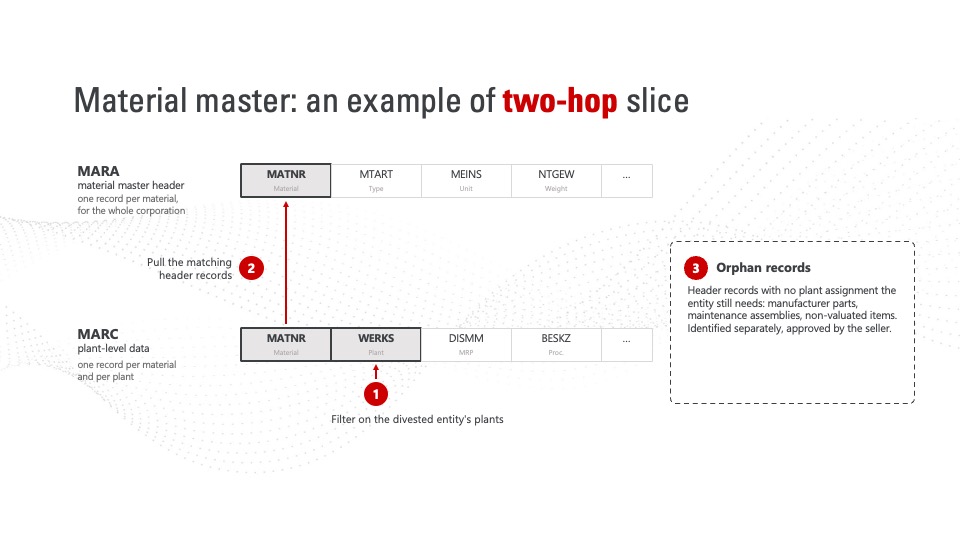
Some examples of challenges come up in nearly every SAP S/4HANA carve-out … and none of them is solved by filtering on company code.
Every table lands in one of three buckets
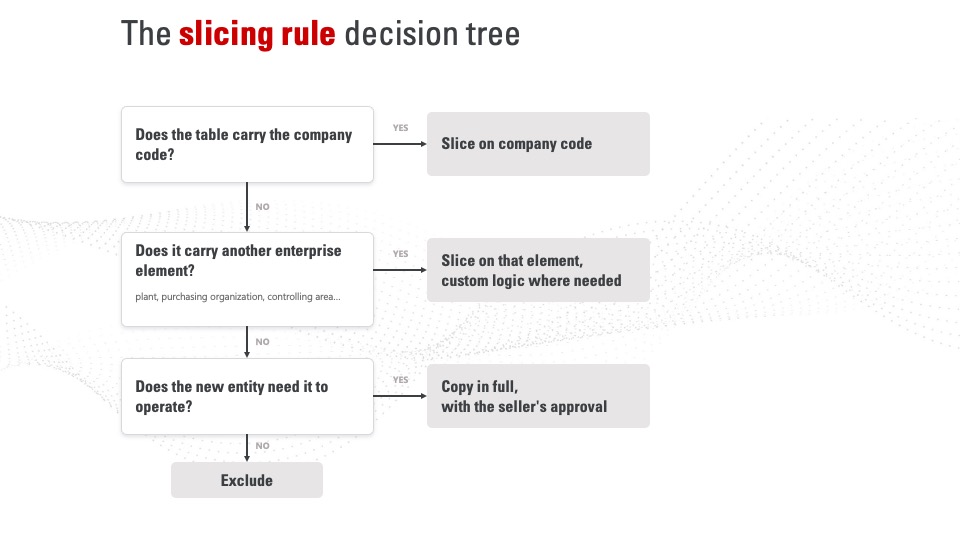
At the end of the analysis, every table is either sliced, copied in full, or excluded. Customizing is generally copied in full, so the new entity keeps the processes it runs today. Master and transactional data are sliced.
Custom Z and Y tables, along with tables delivered by third-party add-ons, default to a full copy. That default is the trap: left unexamined, it quietly carries the seller’s data into the buyer’s system. A real project rules on hundreds of these tables one by one, as a joint business and technical exercise, and that ruling sits on the critical path.
The scope is the schedule
A carve-out project schedule is really a scoping decision made months earlier. The slicing rules described here are the scope, and they are knowable before the TSA is signed, which is when they are still worth something.
oXya runs that assessment for sellers and buyers on both sides of a divestiture.
Frequently asked questions